 Profile 01
Online stores
eCommerce on Shopify, WooCommerce or custom-built that needs reliable revenue by channel and conversions sent properly to Google and Meta.
Web analytics and dashboards
Data you can trust.
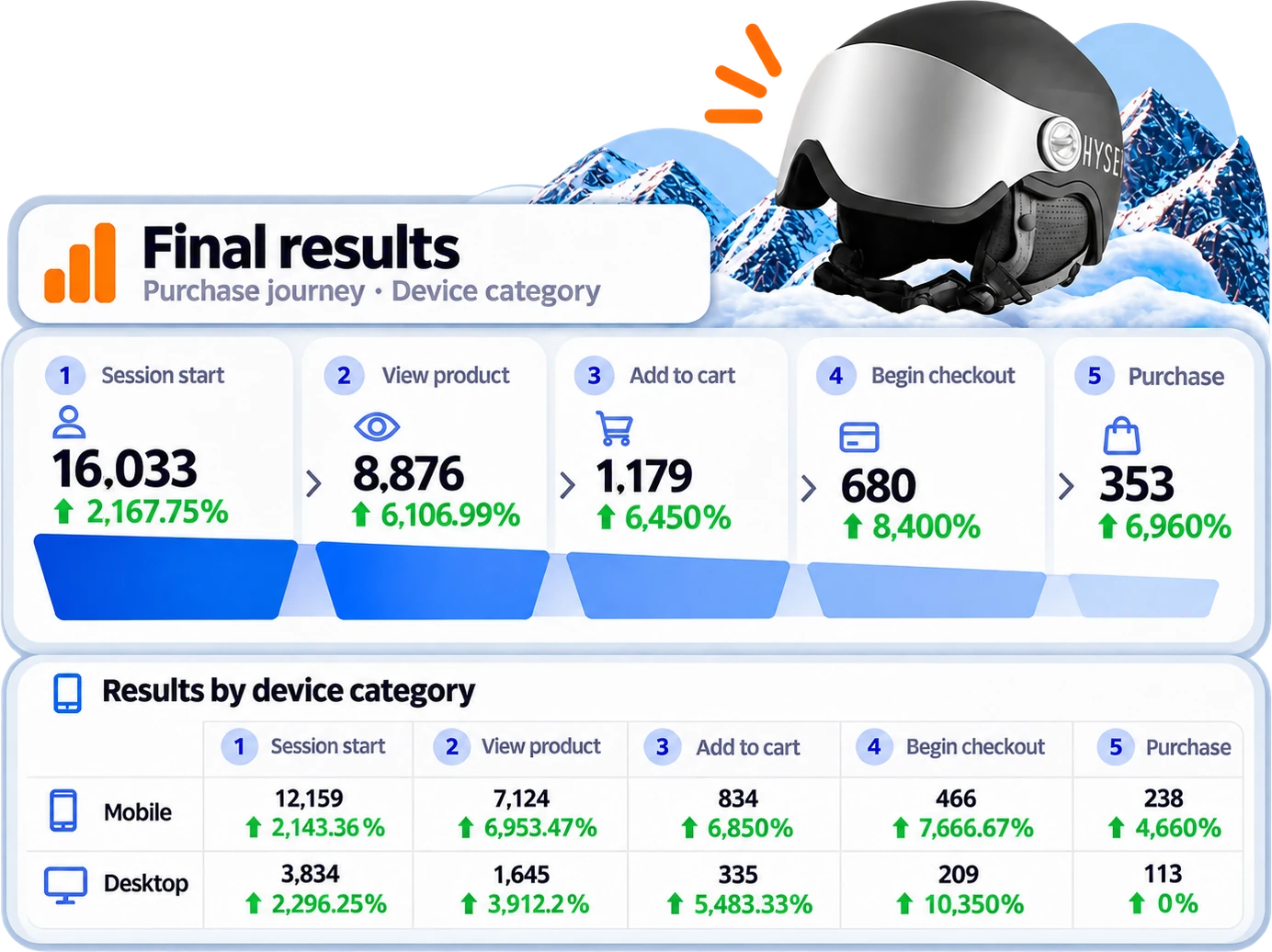
We set up GA4, Google Tag Manager, server-side tagging, Consent Mode v2 and the Meta Conversions API, and sum it all up in dashboards you can understand without being an analyst.

Web analytics is only worth something if it answers business questions: which channel brings in profitable customers, at which step the purchase falls over and how much you can invest to grow. That is why we start with a measurement plan that defines events, conversions and values before touching a single tag.
We implement GA4 and Google Tag Manager and, when the volume justifies it, server-side tagging. We set up Consent Mode v2, required to keep Google measurement and audiences for users in the European Economic Area, and connect the Meta Conversions API and Google Ads enhanced conversions.
Then we sum it up in Data Studio (formerly Looker Studio) dashboards that bring together GA4, Google Ads, Meta, your store and your CRM, and add Microsoft Clarity to view recordings and heatmaps. The properties, containers and data always belong to your business.
The challenge
Before we propose anything, we look at where money or time is being lost. These are the problems we find most often.


 Challenge 01
Google Ads, Meta, GA4 and your store give different sales figures, and nobody knows which to believe or how to compare channels by the same rule.
Challenge 02 Years of plugins, pixels and website changes leave duplicated conversions, events that no longer fire and campaigns optimising towards the wrong data.
 Challenge 03
Poorly configured cookie banners block all measurement or, the other way round, switch it on without permission. In one case you lose data; in the other, you take on a legal risk.
 Challenge 04
Endless exports and dashboards with dozens of charts that do not answer the question that matters: what do we do differently next week.
If the data doesn't add up, neither do the decisions.
What we do
GA4, Tag Manager, Consent Mode v2 and clear dashboards to see which channel really sells.
 01
We review your GA4, Tag Manager, pixels and conversions, find duplicates and gaps, and set out in writing which events, conversions and values your business needs and in what order to implement them.
 02
We implement GA4 with events for ecommerce, forms, calls and WhatsApp, documented in Tag Manager so any future change is orderly and does not break measurement.
03 When the volume justifies it, we set up server-side Google Tag Manager on your own domain to send more complete, better-controlled data to GA4, Google Ads and Meta.
04 We set up a cookie banner with Consent Mode v2 so measurement respects each user's choice and the platforms can model the conversions that are not observed.
 05
We connect the Meta Conversions API and Google Ads enhanced conversions, with real sales values, so the algorithms optimise towards customers and not clicks.
 06
We build dashboards in Data Studio (formerly Looker Studio) that bring together GA4, ads, store and CRM, with an agreed attribution model and Microsoft Clarity to understand on-page behaviour.
How we work
Each phase ends with a deliverable you review and approve, so you always know where your project stands.
We review current measurement, connected accounts and consent, and show you which data is reliable and which is not.
We agree the goals, events, conversions and values that matter with you, and document them before implementing.
We set up tags, consent and connections to the platforms, and test everything in preview mode before publishing.
We compare the data with your real sales over several weeks and correct any significant discrepancy that appears.
We deliver dashboards with the agreed KPIs and each month we review with you what the data says and what to do.
What's included
What we measure and report
A monthly report in plain language and an up-to-date dashboard whenever you need it.
Who it's for
Profile 01 eCommerce on Shopify, WooCommerce or custom-built that needs reliable revenue by channel and conversions sent properly to Google and Meta.
Profile 02 Businesses with campaigns on several platforms that want to compare channels by a single rule and stop deciding on inflated data.
 Profile 03
Managers who need a clear dashboard with sales, acquisition and costs that updates itself, with no reliance on manual spreadsheets.
Industries where we use it most
Real projects
Projects by our team where this service played a key part.
See all workKeep exploring




Start with strategy
Our analytics and dashboards assessment shows you exactly what to improve first, with priorities and timelines.
FAQ
It depends on the size of the site, the number of events and platforms to connect and whether server-side tagging or cleaning up a previous implementation is needed. A services website is simpler than a store with several markets. After the audit we give you a fixed quote in writing.
It is Google's system for adjusting how its tags behave according to what each user accepts in the cookie banner. If you target users in the European Economic Area and use Google Ads or GA4, it is required to keep measurement and audiences. In other markets it also helps you measure in a way that respects privacy.
The tags send data to a server of your own, on your domain, which decides what is shared with each platform. That gives you more control over the information, the website can load fewer scripts and the data reaching GA4, Google Ads or Meta is usually more complete. It has a hosting cost, which is why we only recommend it when it pays off.
Because they count differently: they use different attribution models, conversion windows and recording dates, and each sees only part of the journey. Some difference is normal; a large difference usually points to duplicated tags or badly configured conversions. In the audit we compare them with your real sales to find out which one is off and why.
Yes. The GA4 properties, Tag Manager containers, dashboards and data are created in your business's name, and we work with user access. We leave everything documented so your team or any future provider can maintain it without depending on us.
Let's talk
We reply with specific questions and, if we're a good fit, a clear proposal: what we'd do, in what order, on what timeline and for what budget.
We reply within one business day with what we need to know.
A 30-minute meeting to understand your business and your goals.
A written proposal with plan, timeline and fixed budget.
Ask AI about us





 Loguimark